About Neo4j Server image
Neo4j graph database server image is available in Amazon EC2. The purpose of the AMI is to offer instant and on-demand access to a Neo4j Server environment to help the rapidly growing Neo4j developer community to test and deploy Neo4j-enabled applications.
This Amazon Machine Image is produced and maintained by OpenCredo, UK consultancy delivery partner for Neo Technology.
The image is built on Elastic Block Storage (EBS) root device that enables data to be preserved when the machine is switched off and later restarted (terminating the instance will destroy all data). Other benefits of using EBS-backed instance in comparison to S3-backed instance are faster boot up time and the ability to resize the machine easily when extra processing capacity is needed.
Components
Components included in the image are the following
- Amazon Machine Image
- Regions and AMI IDs
- US East: ami-1e56a977
- US West: ami-b5bceff0
- EU West: ami-5d6e5829
- AP South East: ami-f29be2a0
- AP North East:ami-ce842ecf
- Source: 720777788660/Neo4j Server (Ubuntu 10.04.2 LTS)
- Ubuntu 10.04.2 LTS
- Sun JDK 1.6.0_24
- Installed in /usr/lib/jvm/java-6-sun-1.6.0.24/
- Installed from Ubuntu partner repository (http://archive.canonical.com/ lucid partner)
- Neo4j Server v.1.3 Community Edition
- Installed in /opt/neo4j/
- Listening on port 7474
- Server is configured to start-up automatically when instance is launced (runlevels 2-5)
- Stop/start script is located in /etc/init.d/neo4j-server
- Jython v.2.5.2
- Installed in /opt/jython
- Binary found in the path through symbolic link in /usr/bin
- Jruby v.1.6.1
- Installed in /opt/jruby
- Binary found in the path through symbolic link in /usr/bin
- Python 2.6/3.1
- Python 2.6: /usr/bin/python
- Python 3.1: /usr/bin/python3.1
- Ruby 1.8
- Ruby binary found in the path
- Curl 7.19.7
- Curl binary found in the path
- EC2 API and AMI tools
- EC2 API tools are located in /opt/ec2/ec2-api-tools/
- EC2 AMI tools are located in /opt/ec2/ec2-ami-tools/
- Both tools are updated automatically at instance start-up
- Update process is triggered in /etc/rc.local by calling a script /opt/ec2/updateEC2Tools.sh
- updateEC2Tools.sh is published under GPL license and available in https://github.com/jussiheinonen/scripts
Component Diagram
Get started with Neo4j Server instance in Amazon EC2
Locating Neo4j AMI
- Login to AWS Management Console [http://aws.amazon.com]
- Go to EC2 tab and click AMIs link
- Search for 'neo4j'
- Select the AMI and click Launch
Links to launch the Neo4j Server image
Instead of searching for AMI you can use the following shortcuts to launch the image on AWS Console
Press play to launch Neo4j in US East (Virginia)
Press play to launch Neo4j in US West (California)
Press play to launch Neo4j in EU West (Ireland)
Press play to launch Neo4j in AP South East (Tokyo)
Press play to launch Neo4j in AP North East (Singapore)
Configuring AMI start-up parameters and launching instance
- Specify instance type, eg. Micro (t1.micro), and click Continue
- Enter a description for your instance in User Data field
- Optionally you may tick the box “Prevention against accidental termination”. This option disables theTerminate action in Instance Action -menu which is used to delete the instance and all user data stored on the EBS volume.
- You can associate tags (Key-Value pairs) with the instance Eg. “Neo 4j Server instance A”. Tags may be useful for managing EC2 environment that consists of multiple nodes.
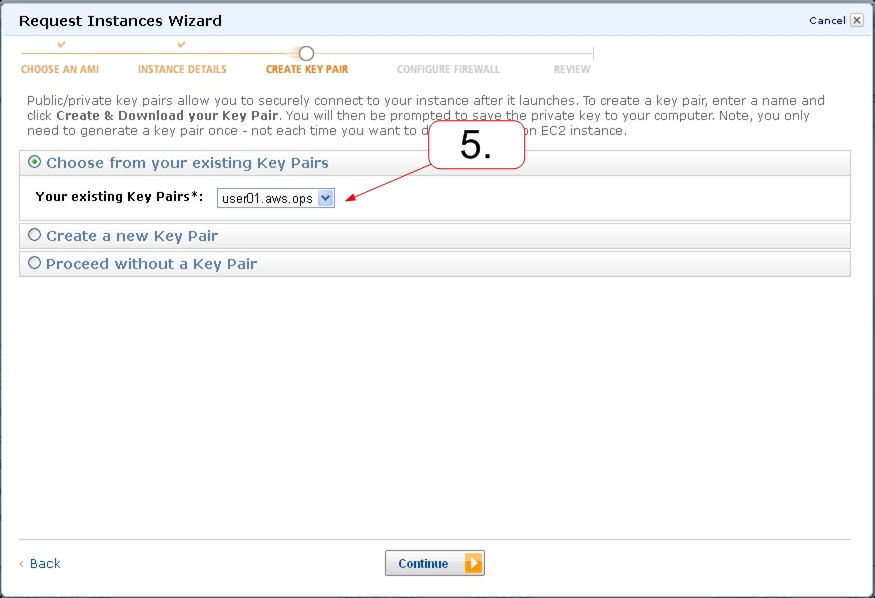
- Associate a Key Pair with your instance. The private key of the Key Pair is used for accessing the instance over SSH. If no Key Pairs exist yet you can create a new Key Pair by selecting the option “Create a new Key Pair”
- Associate instance with a Security Group. Security Group is an access list that can be used to allow and block access to services run on the instance.
- In this example I'll associate instance with Security Group “Neo4j public access”. This Security Group is configured to allow connection from the internet to TCP ports 22 (SSH) and 7474 (Neo4j web administration interface)
- The final step is to confirm instance configuration details. Once confirmed click Launch button and your instance will start up within next couple of minutes.
Accessing instance over HTTP and SSH
Neo4j Web Administration access
Neo4j Server is configured to start-up automatically when instance is launched. Assuming the Security Group is configured to allow access from the internet to TCP port 7474 you can then access Neo4j web administration interface by using the Public DNS name associated with your instance. Public DNS name can be found in instance description view.For example Public DNS name of running Neo4j instance is ec2-12-34-567-89.eu-west-1.compute.amazonaws.com. I can connect to web administration interface by entering address http://ec2-12-34-567-89.eu-west-1.compute.amazonaws.com:7474 in web browser.
SSH access
For SSH access you'll need 2 things: Public DNS name and a copy of the private key from the Key Pair that was selected at the instance configuration phase.
I can connect on SSH from command line by issuing the following command:
ssh -i myprivates.pem ubuntu@ ec2-12-34-567-89.eu-west-1.compute.amazonaws.com


Well done, thanks.
ReplyDeleteFrom the screenshots it seems that the ami is available in the EU-West region. Can you make sure that it is available in the other 3 regions too? From my knowledge AMI images are not shared across regions.
Thanks
Michael
Neo4j image is currently available in EU-west region only but we are working on migrating image across all regions.
ReplyDeleteI'll update this blog entry with image IDs in each region once images are available outside of EU-west.
Thanks for raising this question Michael!
First of all, kudos on this work! I posted this question on Twitter but it might get lost: What is the simplest way to secure a Neo4j instance on AWS from your point of view?
ReplyDeleteI think the simplest way is to use AWS Security Groups to control access to REST API interface on Neo Server.
ReplyDeleteHere is one example how you can configure security groups:
1. Create security group for Neo clients (e.g. #Neo_Client) that contains no rules. I use hash prefix in the security group name to indicate that security group contains no rules and it is used to describe a role of the instance
2. Create security group for Neo server (e.g. Neo_Server) that allows access to REST API port 7474 from #Neo_Client group (Port range: 7474, Source: #Neo_Client)
3. Associate Neo_Server security group with Neo Server instance and launch Neo Server instance
4. Associate #Neo_Client security group with Neo Client instance and launch Neo Client instance
With this configuration only those instances having #Neo_Client security group in configuration will have access to REST API port 7474 on the Neo Server.
To allow access on other services (e.g. SSH) running on the Neo Client instance you can associate multiple security groups with one instance.
For example in Default security group I've a rule to allow SSH access. When launching Neo Client instance I'll select 2 security groups #Neo_Client (access to Neo Server) + Default (access from SSH client).
This comment has been removed by the author.
ReplyDeleteSo with this I could be running Rails on my normal webhost and neo4j at Amazon EC2 in almost no time - almost to good to be true, and perfect timing for an upcoming projet!
ReplyDeleteGreat Post! I am trying to get jython support running on this machine and everything installs fine, but when I try to access the db I get the error below. Any thoughts? Many thanks!
ReplyDelete>>> graphdb = neo4j.GraphDatabase("/opt/neo4j/neo4j-community-1.4.M02/data/graph.db", log=True)
Traceback (most recent call last):
File "", line 1, in
File "/opt/jython/jython-2.5.2/Lib/site-packages/neo4j/__init__.py", line 522, in __new__
neo = core.load_neo(resource_uri, params)
File "/opt/jython/jython-2.5.2/Lib/site-packages/neo4j/_core.py", line 332, in load_neo
return load_neo(resource_uri, parameters)
File "/opt/jython/jython-2.5.2/Lib/site-packages/neo4j/_core.py", line 225, in load_neo
return GraphDatabase(resource_uri, settings, config, log)
File "/opt/jython/jython-2.5.2/Lib/site-packages/neo4j/_core.py", line 230, in __init__
neo = backend.load_neo(resource_uri, settings)
File "/opt/jython/jython-2.5.2/Lib/site-packages/neo4j/_backend/__init__.py", line 74, in load_neo
return impl(resource_uri, implementation.make_map(settings))
at org.neo4j.kernel.impl.transaction.TxModule.registerDataSource(TxModule.java:148)
at org.neo4j.kernel.GraphDbInstance.start(GraphDbInstance.java:123)
at org.neo4j.kernel.EmbeddedGraphDbImpl.(EmbeddedGraphDbImpl.java:89)
at org.neo4j.kernel.EmbeddedGraphDatabase.(EmbeddedGraphDatabase.java:76)
at sun.reflect.NativeConstructorAccessorImpl.newInstance0(Native Method)
at sun.reflect.NativeConstructorAccessorImpl.newInstance(NativeConstructorAccessorImpl.java:39)
at sun.reflect.DelegatingConstructorAccessorImpl.newInstance(DelegatingConstructorAccessorImpl.java:27)
at java.lang.reflect.Constructor.newInstance(Constructor.java:513)
at org.python.core.PyReflectedConstructor.constructProxy(PyReflectedConstructor.java:210)
org.neo4j.kernel.impl.transaction.TransactionFailureException: org.neo4j.kernel.impl.transaction.TransactionFailureException: Could not create data source [nioneodb], see nested exception for cause of error
Thank you very much, Jussi!
ReplyDeleteIt works really well.
Just a note: If you are new to the SSH access the "user name" for this server is "ubuntu".
That is what the "ubuntu@" does in the string copied from above.
I can connect on SSH from command line by issuing the following command:
ssh -i myprivates.pem ubuntu@ ec2-12-34-567-89.eu-west-1.compute.amazonaws.com
So if you are using WinSCP do the following:
1. Use puttygen to convert your .pem file into a privatekey.ppk
2. Open WinSCP and paste the public url as host name
3. Enter: "ubuntu" as the "User name"
4. Load the privatekey.ppk you got from puttygen
5. Select SCP as the protocol
That's it.
Jussi, do you have any idea how to upgrade to 1.4 on this AMI once you have an instance running?
ReplyDeleteIs it as simple as replacing the linux version of community 1.4 server folder on the Amazon instance, or is there more to it than that?
Andre
Excellent post Jussi.
ReplyDeleteI can't access the web administration interface from my machine through :7474 as in your exmaple. I already set the 7474 TCP rule with source 0.0.0.0/0 like in your example.
Am I missing something?
Did you create the rule and associate its Security Group with the instance at launch time?
DeleteIf you may try accessing the admin ui locally on the machine by running command: wget -qO- http://localhost:7474
If Neo4j admin ui is running properly you should see HTML printed into stanrdard out.
Hi,
ReplyDeleteMaybe I am misunderstanding something, but my question is: Is the data persistent? Is there a way to use Amazon S3 to persist the data? As per my understanding the data will be stored in the virtual machine, right?
Regards,
Fernando Avalos.
Hi Fernando,
DeleteImage uses so-called EBS-backed root device which means that data persists on virtual machine when instance is switched off/on. (termination will destroy the data).
EBS-backed instances tend to have slower disk read/write performance in comparison to instance-storage images (non-persistent) but EBS disk IO is still far better than in S3.
There are new set Neo4j AMI's available and related blog post can be found here http://www.opencredo.com/blog/deploying-neo4j-graph-database-server-across-aws-regions-with-puppet